A prebuilt gaming PC gets you playing the day you buy it. A custom build gets you the exact parts you want and a machine that is easy to work on later, so the real prebuilt vs custom PC question is how soon you need it and how much you care about what sits inside the case.
We build both at Computer Cave, and we repair both long after the receipt is filed away. That second part is why our advice reads differently from a spec sheet: we see which parts fail, which cases are miserable to work in, and which bargains cost more in year two.
What to settle before you shop
- Set the budget first, then pick the graphics card. The rest of the build follows those two numbers.
- Buy a prebuilt when you want it running this week, with one box and one receipt.
- Choose a custom build when you want specific parts, a case you like, or room to grow.
- Read three lines on any spec sheet before you believe it: the power supply, the memory and the storage.
- Buy where someone can service the machine later without shipping it across the country.
Prebuilt or custom: which one fits you?
Most buyers land in one of three places. Be honest about which one sounds like you, because the wrong pick usually shows up as regret rather than as a broken PC.
Our own Ready to Game and custom builds cover the first two. For a custom machine you talk through the look and the budget with a builder, we match parts to that budget, and the build is put together in house rather than drop-shipped from somewhere else.
Where prebuilt spec sheets hide the weak parts
A listing sells the processor and the graphics card, because those are the names shoppers recognise. The savings come out of the parts nobody reads. These are the lines we check first, in this order.
The power supply. If the listing gives no brand, no wattage and no efficiency rating, assume the cheapest unit that fit the case. 80 PLUS is the long running efficiency certification for PC power supplies, and it runs through seven levels, from Standard up to Ruby. A seller who names the rating has nothing to hide. Our own Ready to Game sheets print it out, down to the line "Power Supply: 650W 80+ Gold".
Graphics memory. 8GB is still the most common amount of video memory among Steam players, at 26.92% in October 2026, with 16GB just behind at 26.35%. 8GB is fine at 1080p today. If you are buying for 1440p and want the machine to last, that is a good place to spend the extra money.
The memory layout. 16GB as a single stick is not the same as 16GB as a matched pair, and plenty of budget prebuilts ship with one stick to keep the price down. Ask how many sticks and how many free slots.
The storage. A 500GB drive fills up after a handful of modern games. A small SSD paired with an old spinning hard drive is the other common shortcut, and the hard drive is usually the first thing to slow the machine down.
The parts that set the ceiling
Cramped cases with one exhaust fan cook good parts. A machine that throttles under load is slower than its spec sheet in every game you own, and no setting in the game fixes it.
The weakest part sets the ceiling for everything else. A strong graphics card on a thin power supply, in a case with no airflow, is money spent on a number you will never see on screen.
Is a custom build cheaper than a prebuilt?
Not always, and anyone who promises it always is has not priced parts recently. A prebuilt is bought in volume and sold as a finished product, so on a plain midrange spec the two often land close together.
Custom wins on where the money goes. You can skip the glass and the lighting and put it all into the graphics card, or spend on quiet cooling because the PC sits on your desk, or buy a bigger power supply now so the next card drops straight in. You also know every part by name, which matters the day one of them needs replacing.

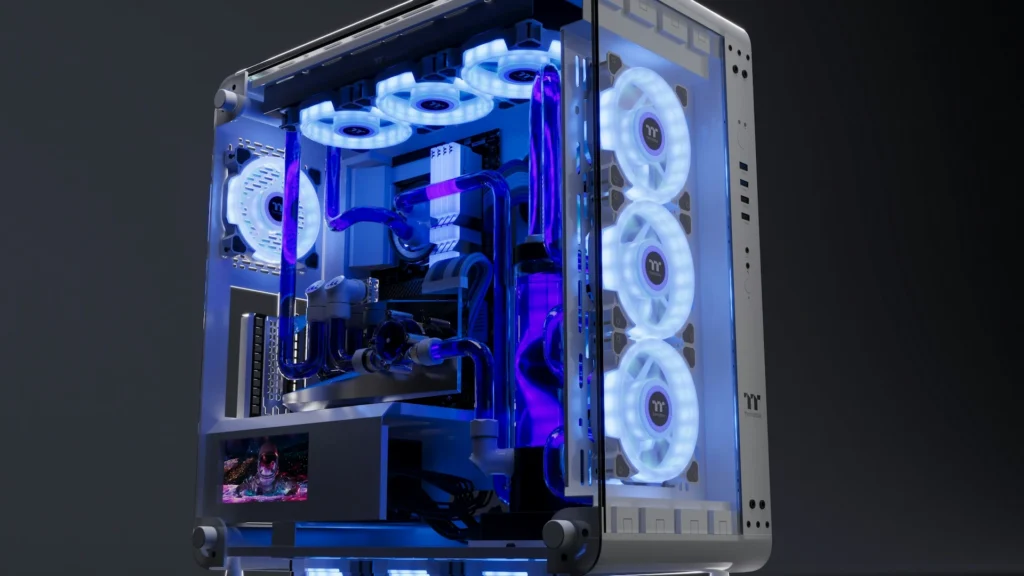
One of the custom builds on our gaming page, with blue RGB fans behind the glass.
Prebuilt wins on time and on simplicity. If the PC is a holiday gift, if you do not want to research parts, or if you want the whole machine to be one person's problem when it misbehaves, buy the finished thing and play.
Can you upgrade a prebuilt later, and does that void the warranty?
Usually yes, and usually no. Under federal warranty law a company generally cannot require you to use its own parts or service to keep a warranty valid, unless it supplies them free or the FTC has granted a waiver. The sticker on the side panel is not the last word, though a part you damage yourself is still on you.
Four things to check before you buy
The real limits on upgrading a prebuilt are physical, so look for these on the listing or ask the seller:
- Power supply wattage, and whether it has spare connectors for a bigger graphics card.
- Free memory slots, so you can add rather than replace.
- Free drive bays and spare M.2 slots for storage.
- Case clearance for a full length card, and whether the motherboard and front panel wiring are standard parts or proprietary ones.
A machine that passes those four is a prebuilt you can keep growing. One that fails them is a sealed appliance, and in two years the only upgrade on offer is a whole new PC. If fitting the part yourself is not your idea of a good evening, our computer repair bench will do it and test it.

Not sure which way to go?
Tell us the games you play and the budget you have. We will say whether a Ready to Game machine covers it, whether a custom build is the better buy, or whether the PC on your desk just needs a part. No appointment needed, and all three stores take walk-ins.
Richmond
Builds, upgrades and repairs downtown at 11 S 15th St, with board level work kept in house.
Charlottesville
Gaming builds and repairs at 1931b Arlington Blvd, a short hop from UVA. Call (434) 484-4508.
Fredericksburg
Builds, diagnostics and repairs at 1255 Carl D Silver Pkwy near Central Park. Call (540) 390-5251.
Questions people ask
Are prebuilt gaming PCs worth it?
Yes, when the spec sheet is honest about the power supply, the memory layout and the storage. A tested machine you can play on tonight has real value, and a good prebuilt is one you can still upgrade in two years.
Is it cheaper to build your own PC?
Sometimes, and less often than people assume. Custom usually wins on getting more of your money into the parts you care about rather than on a lower total at the till.
How much RAM do I need for a gaming PC?
16GB is the sensible floor, and it is the most common amount among Steam players, at 41.42% in October 2026. 32GB is worth it if you stream, edit video or keep a lot open while you play.
Can I upgrade a prebuilt gaming PC myself?
In most cases, yes. Check the power supply wattage and connectors, the free memory slots and the case clearance first. Bring it in if you would rather we fit the part and test it.
What warranty comes with a Computer Cave gaming PC?
Our repairs and pre-owned devices carry a 1 year warranty. For builds, the cover is Pull details from https://computercave.com/warranty/, https://computercave.com/computer-cave-repair-limited-warranty/, and https://computercave.com/custom-build-limited-warranty/, so ask us at the counter before you buy.
Keep reading