

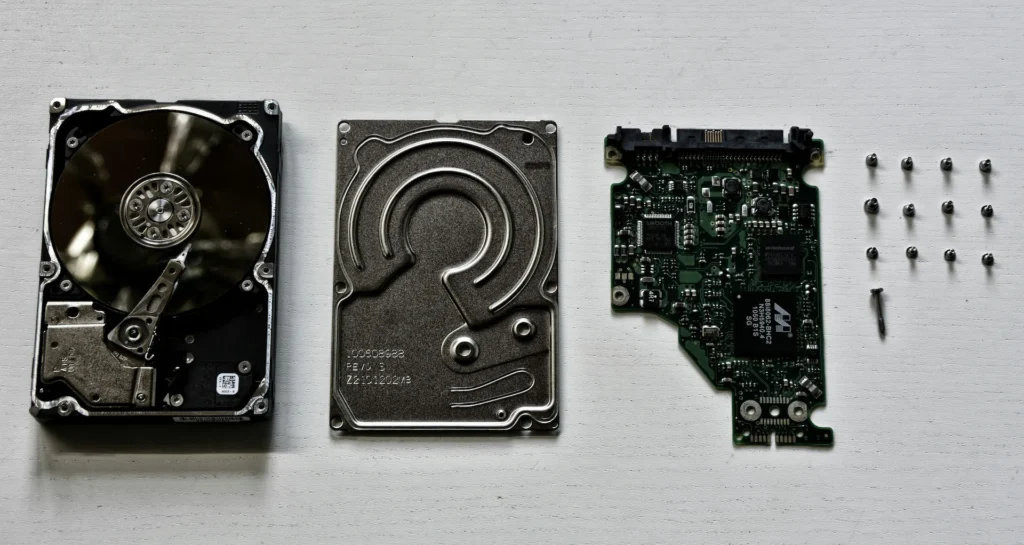
A hard drive clicking noise is a stop signal. Power the drive off now, leave it off, and do not point recovery software at it, because on a mechanical fault every spin-up can take more of your files with it.
That is the whole instruction. The rest of this page covers what the click actually is, the few cases where it is not a dying drive, which DIY steps make a professional recovery harder, and what happens when you hand a clicking drive to us.
What to do in the next five minutes
- Power the drive off and keep it off. Repeated spin-ups are what turn a recoverable drive into an unrecoverable one.
- Loud, metal on metal clicking usually points to a physical failure inside the drive.
- Soft clicking every few seconds can be normal, and clicking on an external drive sometimes traces back to the power supply or cable.
- Do not install or run recovery software on the drive you want back. Software cannot reach a mechanical fault.
- Do not reformat a drive that holds files you still need, whatever a troubleshooting page suggests.
Why is my hard drive making a clicking noise?
A spinning hard drive holds your data on platters, and a set of heads reads it while the platters turn. When those heads cannot do their job, the drive keeps trying, and the repeating noise you hear is the sound of a drive that has lost its place.
Not every click is the same, though, and the difference matters. Seagate's support note on clicking drives splits the sound in two: soft clicking can be the normal sound of a working drive, while hard clicking is loud, metal on metal, and usually means a physical failure.
Western Digital draws the same line for its own drives. Its support page on drive noise lists beeping, clanking, clicking, clunking, grinding and chirping as sounds that are not normal during use.
So the practical test is not whether the drive clicks. It is whether the drive has started making a noise it never used to make, and whether anything happened to it first: a drop, a knock off a desk, a power cut mid-write.
Do not test it "one more time"
Switching a clicking drive on again to see whether it behaves today is the single most expensive thing you can do. Each attempt moves damaged parts across the surface your files sit on, and no recovery lab can undo physical damage to a platter.
What should I do right now?
Unplug it. Then leave it alone until someone can image it, which means copying the drive onto healthy storage and working from that copy rather than from your failing original.
If the drive is still mounting and you can see your files, you get one shot: copy the handful of things that genuinely matter, in order of importance, to another disk. Then stop. Do not sit and wait for a 400GB folder to finish while the drive clicks its way through it.
Do
- Power it off at the first unfamiliar noise and unplug it.
- Note what happened just before: a drop, a spill, a power cut.
- If it still mounts, copy the few files that matter most, once, then stop.
- Bring the drive, or the whole machine, to someone who can image it.
Don't
- Do not leave it running overnight hoping it settles down.
- Do not freeze it, shake it or tap it, whatever a forum thread says.
- Do not install recovery software onto the failing drive or save results back to it.
- Do not open the drive yourself to see what is rattling.
When clicking is not a dying drive
External drives are the common exception. Seagate's guidance points at the external power supply or the cable as a cause worth ruling out, so a different cable or power adapter is a fair thing to try on an enclosure that clicks and will not mount.
Keep that test short and sensible. Try the drive on another port or another computer, with a different cable, once. If it still clicks, you have your answer and the drive goes off.
One piece of standard advice needs a warning attached. Reformatting is sometimes suggested for a corrupted external drive, and it will indeed make the drive usable again, but it is the wrong move if the files on it are the only copy. Recovery first, format later.
What are the other signs a hard drive is about to fail?
Clicking is the loud one. The quieter signs are a machine that freezes during file copies, folders that appear empty or rename themselves to nonsense, files that will not open, a drive that disappears from the desktop and comes back, or a boot that takes several attempts.
Drives mostly fail without a courtesy warning, which is the real argument for a second copy of anything you cannot recreate. Backblaze, which publishes failure rates for the drives in its own data centers, put its 2025 annualized failure rate at 1.36% across a fleet of more than 344,000 drives. Those are drives in a controlled room with monitoring, not one sitting under a desk or in a laptop bag.
Solid state drives are a different story. There are no heads and no platters, so nothing clicks, and an SSD usually works perfectly right up until it does not. If your machine has an SSD and it is behaving strangely, act the same day rather than waiting for a noise that is never coming.
What we do with a clicking drive
The work does not happen on your drive. It happens on a sector by sector image taken onto healthy storage, so the recovery runs against a copy and a drive that gives up halfway through does not take the job with it.
Mechanical failures are the heavy end of that work, and we keep it in house: our page on data recovery says plainly that we do not escalate complex technical issues to another service center. Your drive is not getting boxed up and mailed to a third party you never spoke to.
Privacy matters as much as the files. Our recovery work complies with HIPAA, NIST, PCI-DSS, FERPA and other privacy laws, which is the part that counts when the drive belongs to a practice, a firm or a school rather than a living room PC.
For the longer version of where DIY tools help and where they do damage, read our guide to data recovery in Richmond when DIY fails, or see what our data backup and recovery service covers.
Bring it in before it gets worse
Walk in with the drive, or the whole machine if the drive is inside it. The consultation is free, we will tell you what kind of failure it looks like, and you decide before any work starts.
Richmond
Our Richmond store is at 11 S 15th St, and it is the easiest drop-off for anyone in the city, Carytown, VCU or Henrico.
Charlottesville
Bring a failing laptop, an external drive or a bare disk to our Arlington Blvd store. No appointment needed.
Fredericksburg
Drop off a drive, an external backup or the laptop it lives in, and we will tell you what we are dealing with.
Questions people ask
Can a clicking hard drive be fixed?
Sometimes, but "fixed" is the wrong goal: the aim is to get the data off, not to save the drive. A drive that has clicked its way through a head problem is not one you should trust with your files again, even if it mounts afterwards.
Why is my external hard drive clicking?
On an external drive, check the power supply and cable first, because Seagate names both as causes worth ruling out before you assume the drive is dead. If a different cable and port change nothing, treat it as a physical fault and power it off.
What does a failing hard drive sound like?
Loud metal on metal clicking, grinding, clunking, beeping or a repeating buzz as the drive tries and fails to spin up. Western Digital lists all of those as sounds that are not part of normal operation.
Does recovery software work on a clicking drive?
No. Recovery software is written for logical problems such as deleted files and corrupt file systems, and pointed at a mechanical fault it simply keeps the drive spinning for hours while the damage spreads.
Where can I get data recovery in Richmond, VA?
Bring the drive to our Richmond store at 11 S 15th St, or to our Charlottesville or Fredericksburg stores. Walk-ins are fine, and complex recovery work is done in house rather than shipped out.
Keep reading

